
# 第三方Iframe接入
说明
ZK-VIEW WEB组态平台支持第三方无缝嵌入,第三方接入后,可实现用户接口对接,图纸对接,资源对接
ZK-VIEW 与第三方对接分为:
- Web组态平台本身对接(以下简称平台)
- 导出图纸对接(以下简称图纸)
# Iframe方式嵌入平台
TIP
Iframe 方式嵌入时,可通过 API 接口进行token获取后,将token拼接到Iframe src地址中,进行免密、免注册直接登录
# Iframe 嵌入示例
  <iframe
  src="http://localhost/main?token=eyJhbGciOiJSUzI1NiJ9.eyJhdXRoI..."
  height="800px"
  width="1200px"
  frameborder="0"
  ></iframe>
# 完整嵌入示例
<!DOCTYPE html>
<html lang="zh-cn">

<head>
  <meta charset="UTF-8">
  <meta http-equiv="X-UA-Compatible" content="IE=edge">
  <meta name="viewport" content="width=device-width, initial-scale=1.0">
  <title>Document</title>
</head>

<body>
  <iframe
  src="http://localhost/main?token=eyJhbGciOiJSUzI1NiJ9.eyJhdXRoI..."
  height="800px"
  width="1200px"
  frameborder="0"
  ></iframe>
</body>

</html>
# Iframe直接打开平台图纸
TIP
Iframe 嵌入时,支持直接打开对应的图纸 使用方法: 在iframe链接中,添加图纸 resourcesId 信息即可
- 使用示例
# Iframe 嵌入示例
  <iframe
  src="http://localhost/main?resourcesId=301&token=eyJhbGciOiJSUzI1NiJ9.eyJhdXRoI..."
  height="800px"
  width="1200px"
  frameborder="0"
  ></iframe>
# 完整嵌入示例
<!DOCTYPE html>
<html lang="zh-cn">

<head>
  <meta charset="UTF-8">
  <meta http-equiv="X-UA-Compatible" content="IE=edge">
  <meta name="viewport" content="width=device-width, initial-scale=1.0">
  <title>Document</title>
</head>

<body>
  <iframe
  src="http://localhost/main?resourcesId=301&token=eyJhbGciOiJSUzI1NiJ9.eyJhdXRoI..."
  height="800px"
  width="1200px"
  frameborder="0"
  ></iframe>
</body>

</html>
# 云部署图纸嵌入直接打开
TIP
ZK-VIEW支持云部署页面在Iframe方式下嵌入,并直接打开 src:云部署地址?token=...
# Iframe 嵌入示例
  <iframe
  src="http://localhost/zk/aaa?token=eyJhbGciOiJSUzI1NiJ9.eyJhdXRoI..."
  height="800px"
  width="1200px"
  frameborder="0"
  ></iframe>
# 完整嵌入示例
<!DOCTYPE html>
<html lang="zh-cn">

<head>
  <meta charset="UTF-8">
  <meta http-equiv="X-UA-Compatible" content="IE=edge">
  <meta name="viewport" content="width=device-width, initial-scale=1.0">
  <title>Document</title>
</head>

<body>
  <iframe
  src="http://localhost/zk/aaa?token=eyJhbGciOiJSUzI1NiJ9.eyJhdXRoI..."
  height="800px"
  width="1200px"
  frameborder="0"
  ></iframe>
</body>

</html>
# 平台与父页面进行Iframe通信
TIP
ZK-VIEW 组态平台与第三方通过Iframe接入时,支持Iframe通信自定义开发
# 第三方父页面接入代码示例
<!-- 父页面示例代码 -->
<!DOCTYPE html>
<html lang="zh-cn">

<head>
  <meta charset="UTF-8">
  <meta http-equiv="X-UA-Compatible" content="IE=edge">
  <meta name="viewport" content="width=device-width, initial-scale=1.0">
  <title>Document</title>
</head>

<body>
  <iframe id="childFrame"
          src="http://localhost/main?token=eyJhbGciOiJSUzI1NiJ9.xxx"
          height="800px" width="1200px" frameborder="0"></iframe>
</body>
<script>
  const iframeEl = document.getElementById('childFrame')

  // 监听消息
  window.addEventListener('message', function (e) {
    // 打印接收到的消息
    const msg = e.data
    console.log('接收到子页面消息:', msg)
    if (msg.type === 'ready') {
      // 发送
      sendMessageToChild(iframeEl, {
        type: 'parentMessage',
        data: '这是父页面发送的消息'
      })
    }
  }, false)


  function sendMessageToChild (iframeEl, data) {
    iframeEl.contentWindow.postMessage(data, '*');
  }
</script>

</html>
# 平台接收消息二次开发示例代码
文件路径 /html/static/js/IframeMessage.js
/**
第三方通过 Iframe 方式嵌入组态平台
通过 Iframe 消息通信的处理接口
*/

// 监听父页面消息
window.addEventListener('message', function (e) {
  // 打印接收到的消息
  // const msg = e.data
  // console.log('接收到父页面消息:', msg)
}, false)

// 向父页面发送消息
function sendMessageToParent (sendData) {
  // 向父页面推送消息
  window.parent.postMessage(sendData, '*')
}

// 加载完成后立即通知父页面加载完成,可接收消息
sendMessageToParent({
  type: 'ready',
  data: '这是子页面发送的消息'
})
# 图纸与父页面进行Iframe通信
TIP
平台制作的图纸与第三方通过Iframe接入时,支持Iframe通信自定义开发
# 第三方父页面接入代码示例
<!-- 父页面示例代码 -->
<!DOCTYPE html>
<html lang="zh-cn">

<head>
  <meta charset="UTF-8">
  <meta http-equiv="X-UA-Compatible" content="IE=edge">
  <meta name="viewport" content="width=device-width, initial-scale=1.0">
  <title>Document</title>
</head>

<body>
  <iframe id="childFrame"
  src="http://localhost:8888"
  height="800px" width="1200px" frameborder="0"></iframe>
</body>
<script>
  const iframeEl = document.getElementById('childFrame')

  // 监听消息
  window.addEventListener('message', function (e) {
    // 打印接收到的消息
    const msg = e.data
    console.log('接收到子页面消息:', msg)
    if (msg.type === 'ready') {
      // 发送
      sendMessageToChild(iframeEl, {
        type: 'parentMessage',
        data: '这是父页面发送的消息'
      })
    }
  }, false)


  function sendMessageToChild (iframeEl, data) {
    iframeEl.contentWindow.postMessage(data, '*');
  }
</script>

</html>
# 图纸接收消息二次开发示例代码
消息对接配置位置
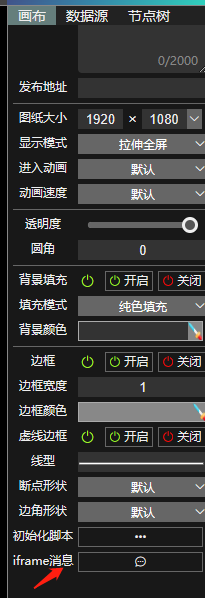
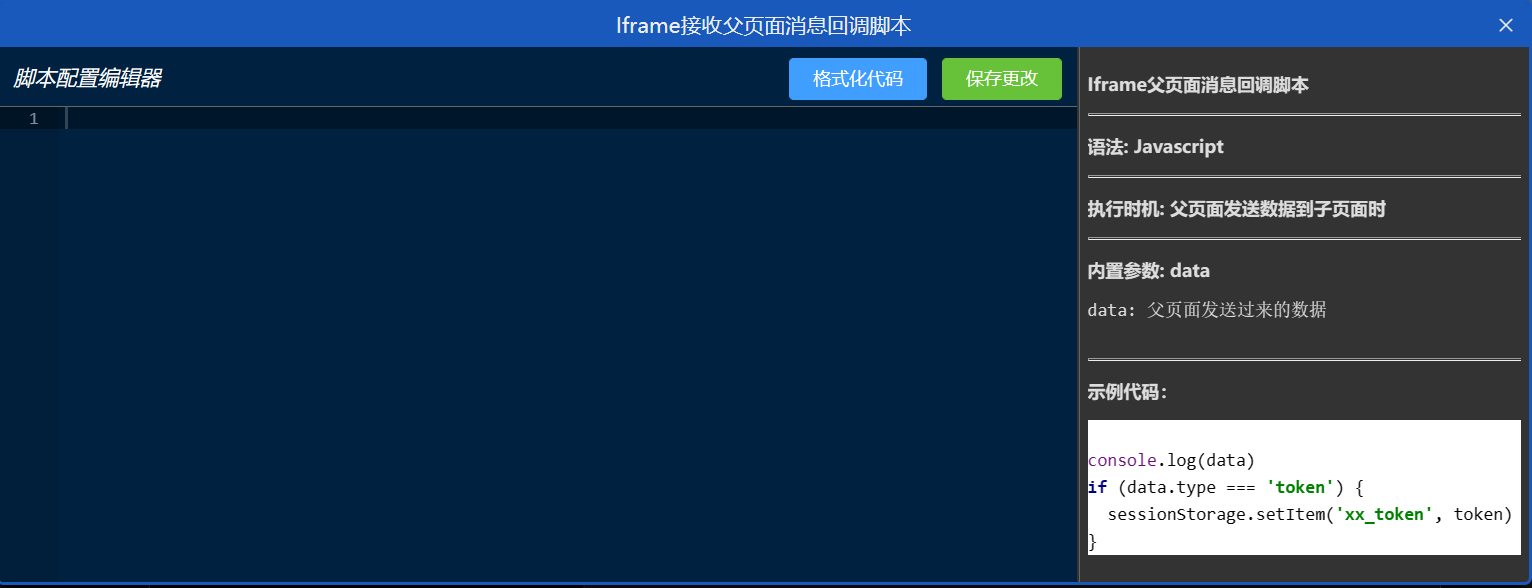
示例代码
console.log(data)
if (data.type === 'token') {
  sessionStorage.setItem('xx_token', token)
}